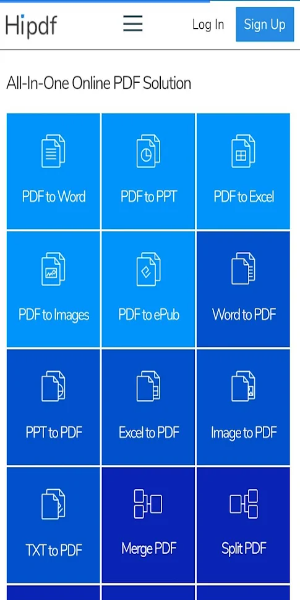
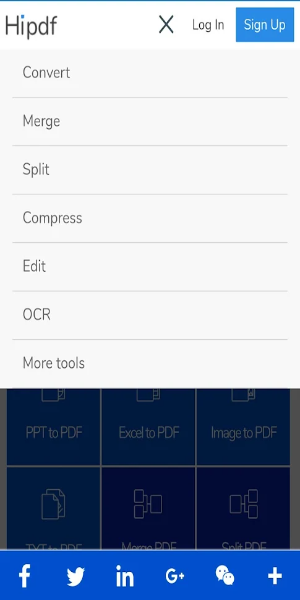
HiPDF is a flexible online PDF tool that lets you convert, merge, split, and compress PDF files with ease. Without registration, advertising, or watermarks, you can handle your PDFs securely and quickly. All features are accessible directly through your browser, offering a handy answer to all your PDF requirements.
An In-Depth Look at HiPDF: The Complete PDF Tool
In our connected world, working with PDF files effectively is essential for personal, school, or work-related tasks. That’s where HiPDF comes in – a reliable online platform built to handle every PDF job clearly and accurately. With a full suite of features that require no sign-up, no ads, and no watermarks, HiPDF is the top choice for smooth PDF management. Let’s examine what makes HiPDF a must-have for PDF handling.
What is HiPDF?
HiPDF is a capable online service created to manage a variety of PDF tasks. Whether you’re converting, merging, compressing, or splitting files, HiPDF delivers a complete toolkit that makes PDF organization simple. Its intuitive layout allows people with limited technical experience to use its tools with confidence.
Main Features of HiPDF
PDF to Word Conversion
Converting PDFs to Word format is often necessary when editing or pulling text is needed. HiPDF’s PDF to Word tool keeps the original design and formatting intact, making the move from a fixed PDF to an editable Word file smooth. This is especially helpful for business users and students who want to update or reuse text from PDFs in other documents.
PDF to JPG Conversion
At times, you might need to turn certain pages or a full PDF into images. HiPDF’s PDF to JPG converter lets you pull out high-resolution images from PDFs. This works well for creating graphics or when sharing PDF content in a more universal image style.
Merge PDF Files
Bringing several PDFs together into one document is a frequent need for compiling reports, presentations, or other multi-page materials. HiPDF’s merge PDF tool makes it simple to join different PDFs into one unified file. The easy-to-use interface lets you drag and drop files, organize them as you want, and merge everything in just a few clicks.
Split PDF Files
On the other hand, breaking a big PDF into smaller, easier-to-handle files is just as useful. Whether you want to separate a long document into parts or take out specific pages, HiPDF’s split PDF feature gives you a simple method. You can define the pages or page ranges to extract, allowing full control over how PDF content is arranged.
Compress PDFs
Oversized PDFs can be awkward to handle, especially when emailing or uploading to websites. HiPDF’s compress PDF function shrinks file size without losing content quality. This helps guarantee faster uploads and better storage use while keeping text and images clear.
Edit and Annotate PDFs
While not listed in the basic overview, HiPDF also provides editing and annotating options. You can change text, insert comments, highlight passages, and add shapes or stamps. These features are great for document reviews, giving input, or customizing PDFs for specific uses.
No Sign-Up Necessary
A key benefit of HiPDF is that all tools are available without asking users to register or sign in. This speeds up the process and safeguards privacy, since no personal data is required to use the services.
Ad-Free and No Watermarks
In contrast to many free PDF tools that include ads or watermarks in results, HiPDF offers a neat and distraction-free experience. No ads mean you can concentrate only on your PDF work, and no watermarks ensure your completed documents stay polished and clean.
Nothing to Download
HiPDF works completely online, so there’s no need to download or install programs. This lowers the chance of software troubles and means you can get to the tools on any internet-enabled device.
Easy-to-Use Interface
The platform’s simple design and clear navigation help all skill levels complete PDF tasks smoothly. Drag-and-drop support, step-by-step guidance, and fast processing all add to a fluid and productive experience.
Advantages of Using HiPDF
-Convenience: Manage your PDFs from any internet-connected device, without extra programs or setup.
-Efficiency: Get tasks done fast with a set of tools focused on simplifying PDF handling.
-Privacy and Safety: With no sign-up and no watermarks, your files stay confidential and secure.
-High-Quality Output: Expect precise conversions, merges, splits, and compression that protect your document’s integrity.
Final Thoughts
HiPDF is a versatile and easy-to-use online service for all PDF tasks. Its broad range of tools, paired with no-registration, ad-free, and watermark-free operation, makes it a vital resource for organizing PDF files. Whether you need to convert, merge, split, or compress PDFs, HiPDF offers a dependable and effective solution for casual users and experts alike. Download the app or go to the website now to see how HiPDF can simplify your PDF work and boost your efficiency.
Tags : Productivity