ES File Decrypter is a specialized tool designed to unlock files encrypted by ES File Explorer. It's the perfect solution for users who need to access their data but have lost or forgotten the encryption password. With this app, you can quickly and efficiently regain access to your encrypted files—no original password required.
An In-Depth Look at ES File Decrypter
In today's digital landscape, managing encrypted files can be challenging, especially when passwords are misplaced. ES File Decrypter addresses this common problem by providing a way to decrypt files locked by ES File Explorer without the original password. This overview will explore the app's functionality, how to use it, key features, design, user experience, strengths, and limitations.
A major advantage of ES File Decrypter is that it's completely free, making it an accessible solution for anyone facing file encryption issues. The app is straightforward and user-friendly, allowing you to decrypt files without complex steps or technical knowledge.
How to Use It
Using ES File Decrypter is a simple process. Follow this step-by-step guide to decrypt your files effectively:
*Launch the App: Open ES File Decrypter. You'll see a clean, intuitive interface designed to make decryption easy.
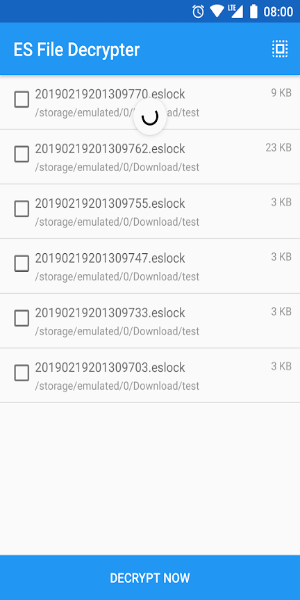
*Select Encrypted Files: Tap the option to choose the encrypted file(s) you want to decrypt. The app will guide you through your device's storage to locate the file.
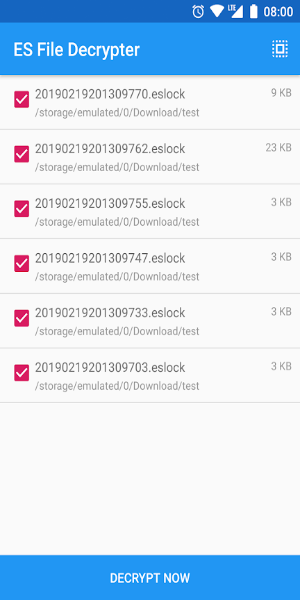
*Start Decryption: Once you've selected the file, begin the decryption process. ES File Decrypter will work to unlock the file without needing the original password. The time required depends on the file's size and complexity.
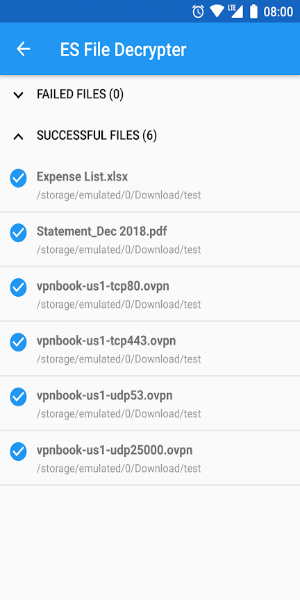
*Access Decrypted Files: After decryption is complete, you can access your file. The app typically lets you save it to a specific location or open it directly.
*Handle Multiple Files: For multiple encrypted files, you can select and decrypt them in batches. This batch processing feature streamlines the task of unlocking several files at once.
What Makes ES File Decrypter Stand Out?
ES File Decrypter includes several key features that boost its functionality and ease of use:
Password-Free Decryption: The app's core feature is decrypting files without the original password, making it invaluable if you've lost or forgotten your credentials.
Free Access: ES File Decrypter is free to use, offering an effective solution at no cost so anyone can solve decryption problems.
User-Friendly Interface: Its simple, intuitive design makes navigation and decryption tasks easy, with clear instructions throughout the process.
Batch Processing: Decrypt multiple files simultaneously—a major time-saver for users with many encrypted files.
Compatibility: The app works specifically with files encrypted by ES File Explorer, ensuring a seamless decryption experience for those files.
Security and Privacy: ES File Decrypter prioritizes user privacy and data security during decryption. It does not store or misuse your decrypted data, keeping your files confidential.
Design and User Experience
ES File Decrypter is designed for a smooth, efficient user experience. Key aspects of its design include:
Clean Interface: A minimalist, clutter-free interface focuses on essential functions, improving navigation and overall usability.
Guided Process: Clear instructions and prompts guide you through each decryption step, minimizing confusion for users of all technical levels.
Responsive Performance: Optimized for speed, the app decrypts files quickly with minimal delays, ensuring a smooth operation.
Device Compatibility: Designed to work across a range of devices and operating systems, so users on different platforms can benefit from its features.
Pros and Cons
Like any application, ES File Decrypter has strengths and areas for improvement. Here's a balanced view:
Pros:
-Efficient Decryption: It decrypts files efficiently without the original password—a huge advantage if you've lost your password.
-Completely Free: The app is free, making it accessible to anyone needing file decryption.
-Batch Processing: Decrypting multiple files at once saves time, especially for users with numerous encrypted files.
-User-Friendly Design: An intuitive interface and guided process make it easy to use, even for non-technical users.
Cons:
-Limited File Support: The app only decrypts files encrypted by ES File Explorer. It won't work with files locked by other methods.
-Potential Security Risks: While the app prioritizes privacy, using any decryption tool carries inherent risks. Always download it from a reputable source to avoid security issues.
Download Today and Transform Your Experience!
ES File Decrypter is a valuable tool for handling encrypted files, offering a free, efficient way to access data without the original password. Its user-friendly design, batch processing, and compatibility with ES File Explorer encryption make it a practical choice. While it has some limitations in file support and potential security considerations, its overall functionality and accessibility make it a worthwhile addition to your toolkit. Download ES File Decrypter today to regain access to your encrypted files and simplify your file management.
Tags : Tools